

2026
November
🛒 One Cart at a Time in Each Automation
When a customer abandons a new cart while still in the abandoned cart automation for another one, they now follow only the most recent cart. The earlier one stops at its next step, so the customer never gets repeated emails, messages or coupons. On the automation screen, the earlier execution shows as canceled. Automations for other events are unchanged.
📈 Sales from the Events You Already Send
Without a connected store, your order and payment events now record the sale too:
order_placed creates the purchase, payment_confirmed marks it paid, charge_paid and subscription_renewed record subscription charges, and order_cancelled, refund_issued and chargeback_received cancel or refund it. Reports, LTV, RFM and attributed revenue work from events alone, with no change on your side. The purchase’s external_id is the event’s order_id, so events and POST /v1/purchases meet on the same purchase and a sale is never counted twice, in any order. Events sent with backfill: true bring in your history. Each account has one sales source: with a connected store, POST /v1/purchases answers 409 sales_source_conflict. Abandoned carts also work with cart_abandoned, with the cart in checkout_id, checkout_token or cart_id, and purchase.created now also arrives for purchases created by an event, with origin: "event".📖 Read how events record sales🛒 Sales through the API, for Organizations That Sell through Their Own System
Organizations without a store integration can now report their sales through the API.
POST /v1/purchases records an order with your system’s external_id, the customer (matched as in events and created if new), the amounts in cents and the currency; paid purchases show up on the home, the Sales screen, campaign and flow revenue, recovered carts, RFM and the customer’s totals. Repeating the same external_id returns the existing purchase, with 200, without counting the sale twice, and POST /v1/purchases/{purchase_id} updates the payment, for example to refunded. Each new purchase triggers the purchase.created webhook. Automations still run on events: send checkout_started, order_placed and payment_confirmed with order_id, and the post-purchase and abandoned-checkout recipes work without a connected store. The MCP got bevits_create_purchase and bevits_update_purchase.📖 Read how to send sales and events🧑 Create Customers through the API, with a Webhook
POST /v1/customers adds a customer with the same fields as events: external_id, CPF/CNPJ, email, phone, name, attributes and consent. If someone already has one of those identifiers, the API returns that customer as is, with 200, instead of creating a duplicate; a new customer comes back with 201 and triggers the customer.created webhook, with the same object as the response. Repeating the request with the same Idempotency-Key returns the original response and never creates a second customer or a second webhook, even when two arrive at the same time.📖 Read the webhook catalog📡 Webhooks: the Store's Events in Your System
In Settings → Webhooks, register your system’s URL and choose the events: emails delivered, opened, clicked, bounced or marked as spam, WhatsApp messages delivered, read and replied, unsubscribes, new customers and orders created, paid, shipped and cancelled. Every request is signed with Standard Webhooks and retried for about 3 days until your URL answers. The log shows the body sent and what the URL answered on each attempt, with resend, test events and secret rotation without losing a delivery. The public API, the SDK, the CLI and the MCP got the same operations.📖 Read the webhooks docs
🏷️ Tag Who Received, Opened or Clicked an Email
In the results of a sent email campaign, the Create tag button tags the customers who received, opened or clicked the email. In Customers → Filters, combine the tags to build any audience, such as who received and didn’t open, or who opened several Black Friday campaigns, and use the segment in an email or WhatsApp campaign. If the tag already exists, the customers join it, so you can gather the audience of several campaigns in one tag. The resend card is now called Second try for those who didn’t open: the Find who didn’t open button builds the segment, which works for a new email campaign, with a different subject, or a WhatsApp campaign.
🎯 Coupon and Giftback Segments, Also Through MCP
In Customers → Filters, the new Coupons and cashback filter finds customers who have an available coupon, haven’t used one, let one expire, used one, received one, or never received one. Pick the source — Cashback (giftback), Any coupon, or Coupons from specific automations — and narrow it down by received in the last N days or, for available coupons, expires in the next N days. With Create segment, the audience is saved and updates itself: customers who spend their giftback leave, and those who get a new one join. Agents connected through the Bevits MCP now also build, preview, and edit segments with the same conditions, add and remove segment customers, create tags, and tag customers — just ask something like “create a segment with customers who have available giftback that expires in the next 7 days”. Nothing is sent: the segment is ready for you to pick as a campaign audience. The public API has the same operations.📖 See how to create and edit segments through MCP
🧩 AI Agents Set Up Your Store and Emails
Agents connected through the Bevits MCP can now set up your store from ready-made recipes: cashback, abandoned checkout, post-purchase, winback, and a VIP campaign. The agent sees what the store is still missing, shows the plan before creating anything, and creates everything paused, with inactive flows and draft campaigns; until something is activated, you can undo it all at once. It also creates email templates, imports emails built in another tool, and prepares draft campaigns for your segments in your brand identity, which you review in Settings → Store → Brand identity. Every write respects your Bevits permissions, and the write option on the authorization screen is now called “Create automations, emails and campaigns”. The public API has the same operations.📖 See recipes, emails, and brand identity
📄 Duplicate an Email Campaign
In each email campaign’s menu, the Duplicate option creates a draft with the same content, sender, subject and audience, including for campaigns that were already sent. Just adjust what changed, like the products, and send it again.
📬 Resend to People Who Didn't Open the Email
In the results of a sent email campaign, the Resend to non-openers button puts the customers who received the email and didn’t open it into a segment. People who unsubscribed, complained or bounced are left out. With one click you create the resend campaign, with the same content and that segment already set as the audience, and you can change the subject before sending the second try.
🎠 Carousel with the Abandoned Cart Products
The WhatsApp carousel now works in automations. In the abandoned cart, each card shows a product the customer left in the cart, with photo, name, price, and the button to complete the purchase.
📖 See how to use the carousel for abandoned carts
🛍️ WhatsApp Catalog
Your Nuvemshop products now show up inside WhatsApp. Bevits generates the catalog feed for Meta, and you send templates with the View catalog and View items buttons; in the abandoned cart automation, the list comes with the products the customer left in the cart. The customer builds the cart in WhatsApp itself and the order arrives in the inbox with items and total. With one click on Generate payment link, Bevits creates the order in your store and leaves the checkout link ready to send. AI customer service also understands these orders and can show catalog products in the conversation. It also works on numbers that use the WhatsApp Business app.📖 See how to set up the WhatsApp catalog
⏸️ Automatic Pause When Meta Changes the Template Category
When Meta reclassifies an approved template during an official WhatsApp campaign, for example from Utility to Marketing, Bevits pauses the campaign before the next message so you never pay more without knowing. On the campaign page you see what changed and choose to resume sending, under the new category, or cancel. If the template moves from Marketing to Utility, sending continues, since it gets cheaper. The pause is on for every campaign and can be turned off in the send step.📖 See how the automatic pause works
📣 AI Agents Create WhatsApp Campaigns
Agents connected through the Bevits MCP, such as Claude, can now create WhatsApp Official campaigns from what you ask in the chat. The agent builds the template with a text or media header, variables such as the customer’s name, a footer, and buttons, checks everything against Meta’s rules, and saves the campaign as a draft with the template already submitted for review. No message is sent: after approval, which usually takes minutes, you pick the audience and send the campaign in Bevits. The tool shows up for people who allowed writing on the connection and have access to the Official WhatsApp Campaigns area. The public API gained the same operation (
POST /v1/whatsapp-campaigns).📖 See how to create WhatsApp campaigns through MCP🤖 AI Agents Create Automations
Agents connected through the Bevits MCP, such as Claude, can now create automations from what you describe in the chat. The agent checks the triggers, conditions, and templates available to your store and saves the flow as a draft that sends nothing. You review it in the editor, confirm in the chat, and only then does the agent activate the flow. The permission is optional: on the authorization screen, “Create and activate automations” starts unchecked and only grants writing if you check it, and existing connections stay read-only until you reconnect. The public API gained the same operations.📖 See how to create automations through MCP
September
🔗 Click Tracking for WhatsApp and SMS Links
Links sent in official WhatsApp campaigns and in WhatsApp and SMS automations are now tracked short links, one per customer. Campaign results show probable human clicks, recipients who clicked, click rate, and performance per button; the automations Performance mode gained a “Clicked” row for WhatsApp and SMS; and the new Logs › Clicks tab lists the last 180 days of clicks by customer and source, keeping previews, bots, and scanners apart. In the store settings you can set a prefix to identify your brand in the links.
August
🛍️ WooCommerce Integration
Connect your WooCommerce store to sync products, categories, customers, and orders. The integration also lets you create automations from store events, including abandoned cart recovery.
🤖 AI Settings per WhatsApp Number
Teams with more than one official number can now choose which numbers the AI should answer on. The organization-wide control remains the master switch, while each number can be enabled or disabled individually.
💬 Custom Start-Conversation Template
Customize the template your team uses to resume conversations after WhatsApp’s 24-hour window. Create messages per number and language, use variables and quick replies, track Meta approval, and choose the default template.
July
📊 Automation Performance
The automation builder now has a performance mode. Track sends, deliveries, and failures by period and step, plus conversions, attributed revenue, and coupon results when applicable.
🔌 Bevits Public API
We launched a read-only public API secured with API keys. Integrations and AI agents can safely query customers, purchases, segments, tags, attributes, automations, and email campaigns.📖 Explore the API documentation
📄 Campaign Audience from a Spreadsheet
You can now import a CSV file with phone numbers to define the audience for an official WhatsApp campaign. Bevits matches existing contacts, creates valid new customers, and reports duplicates or ignored rows before sending.
June
📱 Multiple Official WhatsApp Numbers
One organization can now connect and manage multiple numbers through the Official WhatsApp API. Set a default account and choose the correct sender number when creating campaigns and automations.
May
🛒 AI-Assisted Sales for Nuvemshop
The AI agent can now build orders during a WhatsApp conversation: add products, adjust quantities, calculate shipping options, and send a Nuvemshop checkout link so the customer can complete the purchase.
April
✨ Intelligent AI Pre-Service
Create a pre-service stage for new WhatsApp conversations. You define the instructions and messages — including text, media, and interactive options — and the AI handles the first contact before routing the customer to the next service stage.
🎙️ AI Understands Voice Messages
Customers can send voice messages on WhatsApp and continue chatting naturally with the AI. Bevits transcribes the message and uses its content to reply in the context of the conversation.
March
📸 Instagram in the Inbox and Automations
Connect an Instagram Business or Creator account to receive and reply to DMs in the Bevits inbox. You can also create automations triggered by comments and keywords to send direct messages automatically.
🤖 Automatic Conversation Assignment
Conversations are now automatically assigned to the most suitable agent, with intelligent routing based on availability and history. The system also remembers each customer’s preferred agent to maintain service continuity.
📢 Official WhatsApp Campaigns
Improvements to official WhatsApp campaigns: you can now select header images, view template approval status with visual badges, and receive automatic credit refunds when a send fails.
February
🟣 Shopify Integration
Bevits now integrates with Shopify! Connect your Shopify store to sync customers, products, and orders — and create automations based on events like order paid, abandoned checkout, and customer created.
🎬 Video Sending on WhatsApp
Now you can send videos directly in chat conversations, with full upload and video message rendering.
🌙 Dark Mode in Settings
All settings pages now have full dark mode support.
January
💬 WhatsApp Inbox
We launched the new WhatsApp inbox integrated into the platform. Now you can manage all conversations with your customers directly from Bevits — with search, context menu, deeplinks, starting new conversations, and automatic re-engagement of expired conversations (outside the WhatsApp 24h window).
👥 Teams
Organize your customer service with teams. Now you can create teams, assign members, and route conversations to the responsible team — ensuring each customer is served by the right person.
⚡ Quick Replies with Advanced Templates
Quick replies now support templates with images and interactive buttons, making customer service faster and more professional.
📷 Image Sending in Chat
Now you can send images directly in chat conversations, with preview before sending.
🧠 AI Knowledge Management
New section in store settings to view and manage AI learnings. See what the agent learned from conversations and edit or remove knowledge as needed.
🔍 Product Search by Image
The AI agent can now search products in the catalog using images sent by customers, making recommendations more accurate.
2025
December 22
🛒 Abandoned Cart Data
Now you can see abandoned cart recovery data directly on the Bevits dashboard. How many carts were recovered and how much that represented financially for your store.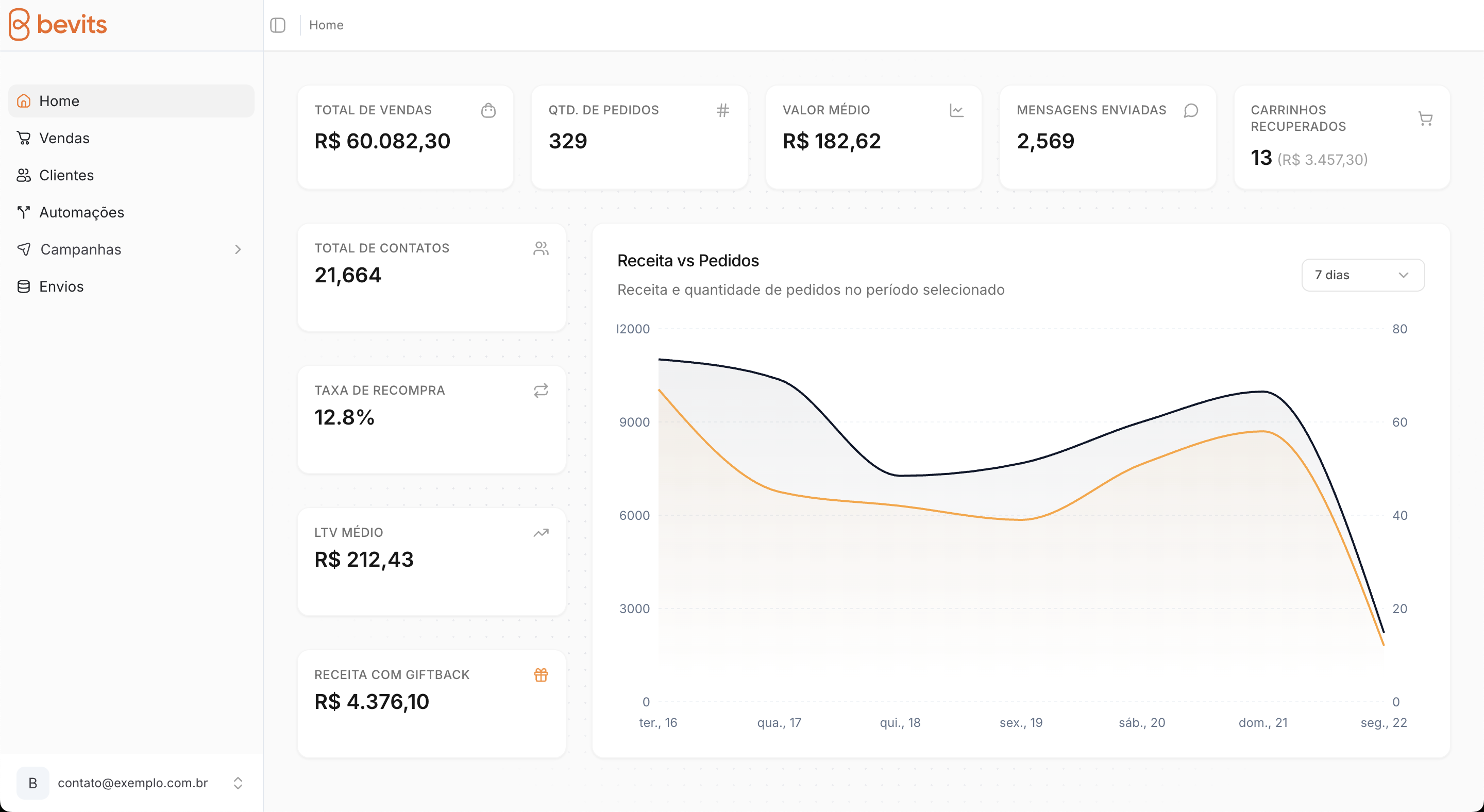
December 15
🏷️ Add tags to customers
Now within an automation you have the tags block to add or remove tags from customers. This is useful for improving your customer segmentation and creating more personalized campaigns.
Example:
A shampoo brand can create automatic tags based on the purchased product, such as “curly hair”, “oily hair” or “dry hair” — allowing specific campaigns for each type of customer.
December 8
🔍 Filter customers based on products and categories
Now you can filter your customers (and create custom segments) based on purchased products and categories. This is useful for creating more personalized and targeted campaigns for your customers.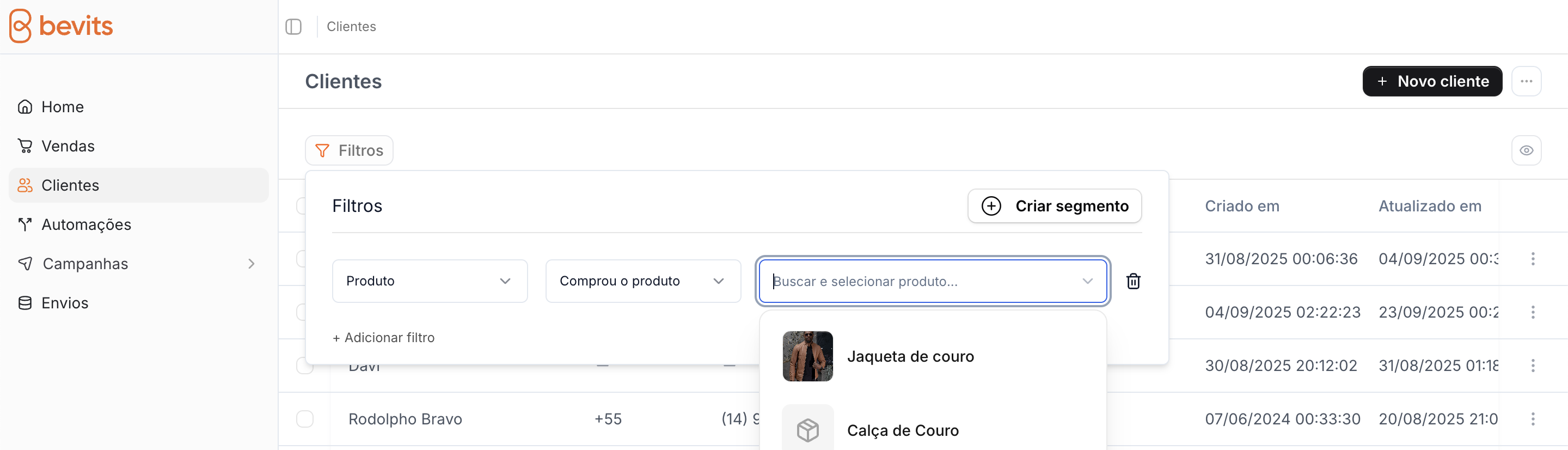
Example:
A clothing store can create a campaign for customers who purchased products from a certain category, such as “t-shirts”, “pants” or “shorts” — allowing specific campaigns for each type of customer.
October
📦 Automation for Order Delivered (Nuvemshop)
Now you can create automations for when an order is marked as delivered on Nuvemshop.
Not all Nuvemshop stores have this information available. If you’re not seeing this trigger in your automations, you can send a message to support so we can check.
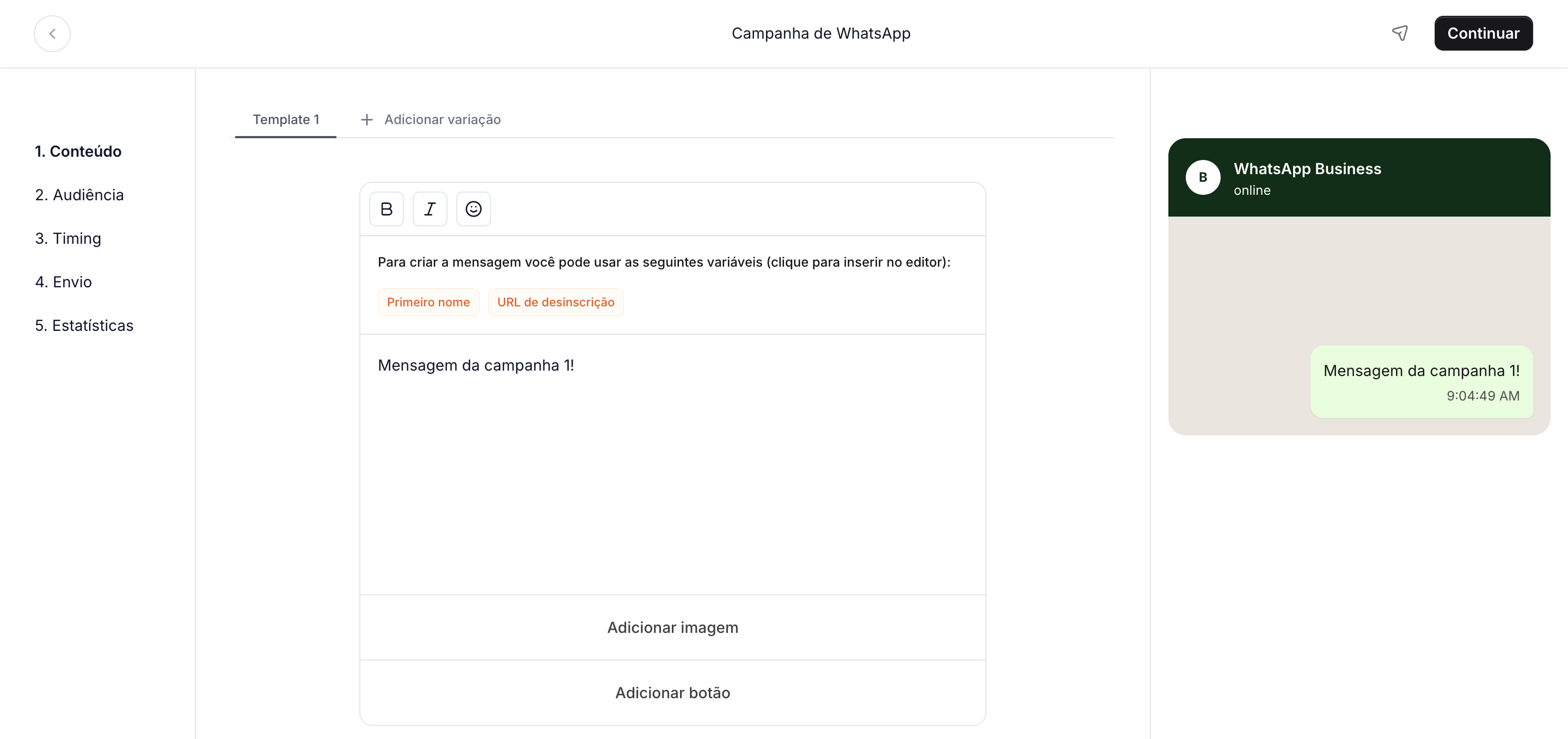
💬 Message Variations in WhatsApp Campaigns
A WhatsApp campaign can now have more than one message variation, making campaign sending safer and reducing the risk of blocks.
🏷️ Nuvemshop + Bling Integration: Automatic Coupon Redemption
For stores that use Nuvemshop together with Bling, you can now automatically redeem the coupon generated in Nuvemshop through Bling.Just type
coupon:nuvemshop:enter_coupon_code_here in the Internal Notes field in Bling.📱 Filter by Area Code
Now you can filter your customers based on the area code of the saved phone number.Just select “Phone number” + “Starts with” and add the desired area code.
🎨 New Email Footers
We added 2 new footer designs in the email components, making it easier to create beautiful and professional emails.
September 7
👁️ Message Preview
Now you can view the content of the message that was sent to the customer in an automation.

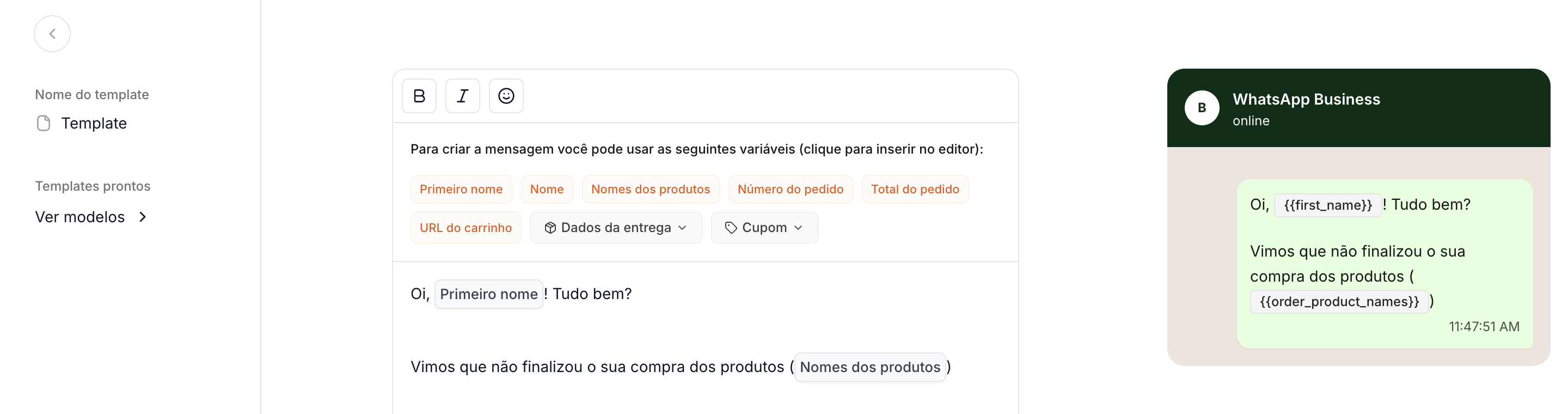
📝 Product Names
We made the product names variable available for you to use in your automations. This makes messages more personalized and attractive to the customer.
September 5
🟢 Bling Integration
Now you have another channel to create message automations for your customers (especially for those who buy at your physical store).One of the most powerful (and awaited) automations is the ability to create Giftback programs for your customers who buy at your physical store.
September 3
📍 City and State Filter
The CRM is one of our greatest treasures here at Bevits.And thinking about improving your experience even more (and helping you be even closer to your customers), we created city and state filters so you can create customer segmentations for those who live in a specific location.📖 See complete documentation for the city and state filter
August 23
🚚 Delivery Variables
Now when sending a message or email, you can use delivery variables to personalize the message for the customer.
August 11
📈 WhatsApp Campaign Metrics
Now you can track the results of a sent WhatsApp campaign, knowing exactly which customers purchased within 72 hours after receiving the campaign message.
July 29
🎁 Giftback Launch
Now you can automatically reward your customers with credits back on their purchases! Giftback is here to increase engagement and loyalty in your store.📖 See complete Giftback documentation
What’s New
- ✨ Giftback: Automatically reward your customers with credits back on their purchases!
For support or questions about updates, contact us at hey@bevits.com